> For the complete documentation index, see [llms.txt](https://smadi0x86-blog.gitbook.io/smadi0x86-playground/llms.txt). Markdown versions of documentation pages are available by appending `.md` to page URLs; this page is available as [Markdown](https://smadi0x86-blog.gitbook.io/smadi0x86-playground/certifications/certified-kubernetes-administrator/storage.md).
# Storage
## Storage in Docker
#### When we build a docker image and run the container, it gets split into two parts:
If we delete the container, the data inside the container which are temp.txt and the modified app.py gets deleted.
#### What if we want to persist this data? For example, if we have a database and preserve the data created by the container, we can create a persistent volume:
* First we create a volume which will be stored at /var/lib/docker/volumes directory
```bash
docker volume create data_volume
```
* Mount the volume as we run the docker container into the default mysql storage path
```bash
docker run -v data_volume:/var/lib/mysql mysql
```
{% hint style="success" %}
If you didn't create a volume yourself, docker creates one by default in the `/var/lib/docker/volumes` folder
{% endhint %}
### Mount options
#### There are two types of mounting volumes in docker:
* **Volume mount:** Mounts a volume from the `/var/lib/docker/volumes` folder
* **Bind mount:** Mounts a volume from any location on the docker host
#### Using the `-v` to mount a volume is an old way, use the `--mount` options which is more verbose and include more parameters:
```bash
docker run --mount type=bind, source=/data/mysql, target=/var/lib/mysql mysql
```
#### Docker has different storage drivers to mount volumes:
* AUFS
* ZFS
* BTRFS
* Device Mapper
* Overlay
* Overlay2
{% hint style="warning" %}
Volumes are not handled by storage drivers, volumes are handled by volume driver plugins
The default volume driver plugin is `Local`, therer are many plugins such as Azure File Storage, gce-docker, Flocker, RexRay etc...
Some of these volume drivers support different storage providers, for example RexRay can be used to provision storage on AWS EBS.
{% endhint %}
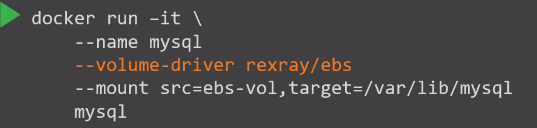
#### You can specify the volume driver when running a docker container, for example to provision a volume from AWS EBS:
This will create a container and attach a volume from AWS, when the container exits, your data is saved in the cloud.
## Container Storage Interface (CSI)
As mentioned before, Kubernetes as it grown in popularity, many vendors needed different container runtimes to use on Kubernetes, this is when the `Container Runtime Interface (CRI)` was introduced to allow different container runtimes in Kubernetes.
Similarly, `Container Networking Interface (CNI`) was introduced to extend support for different networking solutions, so any networking vendor can develop their plugin based on the CNI standard.
So the `Container Storage Interface (CSI)` is created for the same purpose, to allow several vendors to develop their plugins for using storage in Kubernetes, it is a universal standard to work with any container orchestrator.
{% hint style="success" %}
All these interfaces (CRI, CNI, and CSI) are designed to extend Kubernetes support for various vendors and technologies in the areas of runtime, networking, and storage respectively.
{% endhint %}
## Volumes
Just as in docker, pods if deleted, the data within it gets deleted.
We will create a pod to choose a number between 0-100 and save it to `/opt/number.out`, if we didn't create a persistent volume, the `number.out` file will be deleted.
If pod is deleted, the `number.out` file will still live in `/data` on the host.
{% hint style="danger" %}
We used the `hostPath` option, but this is not recommended in a multi-node cluster, as every node will have different data.
{% endhint %}
#### Here is an example to configure AWS EBS volume as storage option for the volume:
## Persistent Volumes
As number of pods increase and every developer needs to create his own volumes, it becomes an overhead.
Here is where persistent volumes comes into play, Persistent volumes are cluster-wide volumes configured by admins to offer a large pool of storage and let users deploy applications on the cluster.
The users can select storage from the persistent volume pool using persistent volume claims (PVC).
#### To create a PV:
{% hint style="info" %}
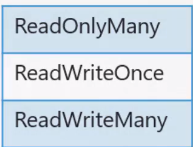
Access mode defines how a volume should be mounted on a host
{% endhint %}
## Persistent Volume Claims
PV and PVC has a 1 to 1 relationship, every PVC is bound to a single PV.
{% hint style="warning" %}
Kubernetes automatically binds PVCs to compatible PVs. This process considers factors like size, access mode, and user-specified requirements.
{% endhint %}
#### To create a PVC object definition:
#### When a PVC is deleted, what happens to the PV?
#### By default, the PV is set to retain, which keeps the PV but it can't be reused in other claims, other options include:
* Delete: Deletes the PV freeing up storage
* Recycle: Data in PV is removed and it can be used in other claims
### Key Takeaways
1. **Create Persistent Volumes (PV)**: Define storage capacity, access modes, and storage source.
2. **Define Persistent Volume Claims (PVC)**: Request storage by specifying required size and access modes.
3. **Automatic Binding**: Kubernetes binds PVCs to compatible PVs automatically.
4. **Mount in Pods**: Use PVCs in pod definitions to attach storage to pods.
### Lab:
Everything went well, I refered to k8s docs although there was a bug in the lab that caused confusion.
{% embed url="" %}
## Storage Classes
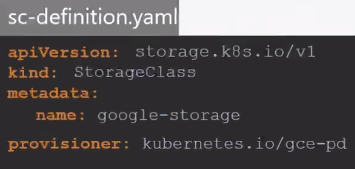
You can define a provisioner like AWS that can automatically provision storage on AWS Cloud and attach it to pods when a claim is made, this is called dynamic provisioning of volumes.
#### This can be done by creating a storage class object definition:
{% hint style="success" %}
Now, we don't need to create PV definition manually, because the PV and any associated storage will be created automatically when the storage class definition is created.
{% endhint %}
#### We must define the `storageClassName` in the pvc definition so it can use the storage class:
#### Next time a PVC is created:
* Storage class uses the defined provisioner to provision a new disk
* Storage class creates a PV and binds it to the volume defined in the pod
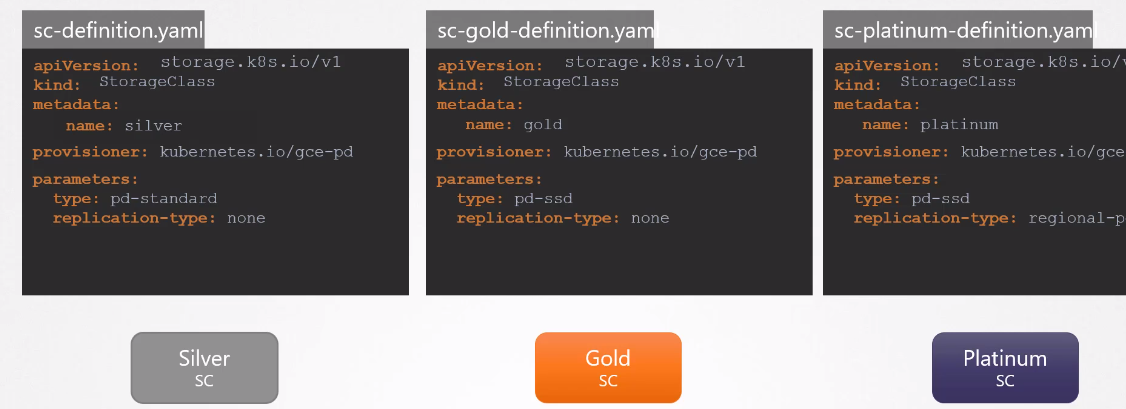
Every storage provisioner plugins such as ones from AWS, GCP, Azure etc... have their own additional parameters such as type of disk, replication-type etc...
#### You can create different storage classes each using a different disk:
{% hint style="info" %}
You can create different classes of storage that you need for your volumes
{% endhint %}
### Lab:
No limitations identified.
{% embed url="" %}
## Slides
{% file src="/files/ZdtP5ZjDZX49oCi5KWId" %}